
input()
If you’ve been following along and made it this far, well done! You’ve covered print command, variables and using them together.
Let’s take those skills you’ve just mastered a step further and get some input from the user.
So far you’ve been entering variable values, now we will create variables that will ask the user for answers and it will store those answers as variable values.
That’s a bit wordy! Let’s get on to an example.
We will use the input command which will pause your program, ask a question and waits for the users response.
Let’s create a program that will
- Give a greeting, like Hello everyone
- Ask the user for their name and store it as a variable
- Reply to the user with a message using the user’s name
The input command can be thought of as variable_name = input(“Enter your question here”).
The first and 3 steps above are nothing new to you, but the second step is new.
Let’s run it and break it down.
print("Hello everyone")
name = input("What is your name?")
print(f"It is nice to meet you {name}")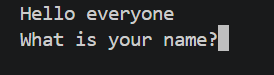
Run the command, the program will run your first line.
Then when it comes to the second line it pauses, it prints the question you included in the quotes.
Enter your answer (in my set up I have to click on the line with the question to enter my answer) and press enter/return and then the program will continue and print your next command.
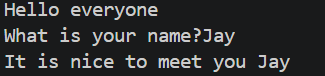
Note that in my reply to the question, I did not have to include quotes.
By default, Python will treat user input as text.
If you want to convert this input to an integer (whole number) you must include the input command within an int() command.
Try this command, it won’t run correctly, but we will fix that in a minute.
price = input("How much is 1 apple?")
quantity = input("How many apples would you like to buy?")
total_price = price * quantity
print(f"That will be {total_price} Euros please")
The program runs and pauses asking the user for the price of an apple.
When you give the response, it continues running and pauses again asking how many apples the user would like.
When you give that response it continues running, comes across a problem and gives a scary looking message!

Don’t be afraid of these, when you see them, break down what the error is.
My problem is in line 3 and it can’t multiply strings.
I need to change my price and quantity variables to be integers.
To wrap an int around your input comment, put “int(” right before your input command and then add a closing bracket to the end of your line (every opening bracket must have a closing bracket).
price = int(input("How much is 1 apple?"))
quantity = int(input("How many apples would you like to buy?"))
total_price = price * quantity
print(f"That will be {total_price} Euros please")
Common mistakes at this point include:
- Forgetting the input() command, the program won’t pause and ask for input
- Forgetting the int(), Python will treat the input as text
- Missing a closing bracket
These are common mistakes and easily made… but also easily fixed!!!
You deserve a break now!
You’ve just created your first interactive Python program!
A lot has been covered and you should take the time to practice input, int, print and variables together.
Pretty soon we will be building a Guess The Number game.
Python will pick a random number and ask the user to guess it and will give some feedback on that.
Before we build that game, our next tutorial will cover if/elif/else conditions and while loops.
At that point you should be patting yourself on the back and smugly feeling like a real coder!